About the mockup
RoleModel is a mockup of a product where you ask questions about people data and get answers with the source shown. This page says what it contains, how it relates to Twine, how it works and how to test it.
Contents
What the mockup is#
RoleModel is a mockup of a people-analytics product for HR. You connect the systems you already have (HR, payroll, scheduling, recruitment and more), ask a question in your own words and get an answer with a number, a chart and the source. The mockup is built to be shown and evaluated, not to be used for real work.
Everything in the demo is example data. The company Stugvandan, its 600 employees on record (420 active and 180 who have left), every name and every figure are made up. No real person, company or system is involved.
Screen by screen#
The app has six parts. You meet them in this order when you go through the demo.
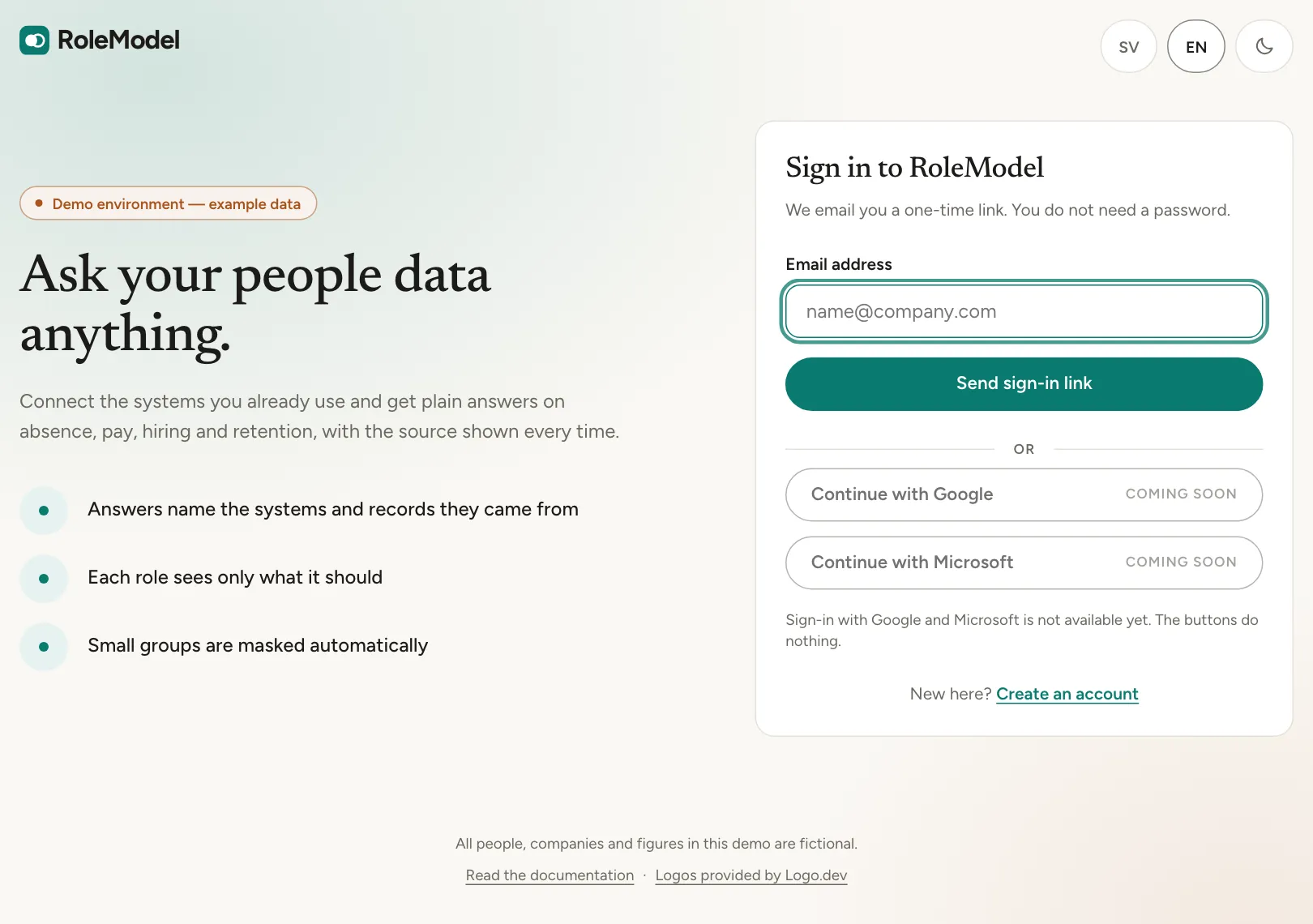
- Sign in. Create an account with your name, work email, role and company, or sign in with your email address. There is no password: you get a one-time link by email that works for 15 minutes. Google and Microsoft are shown as coming soon and do nothing yet.
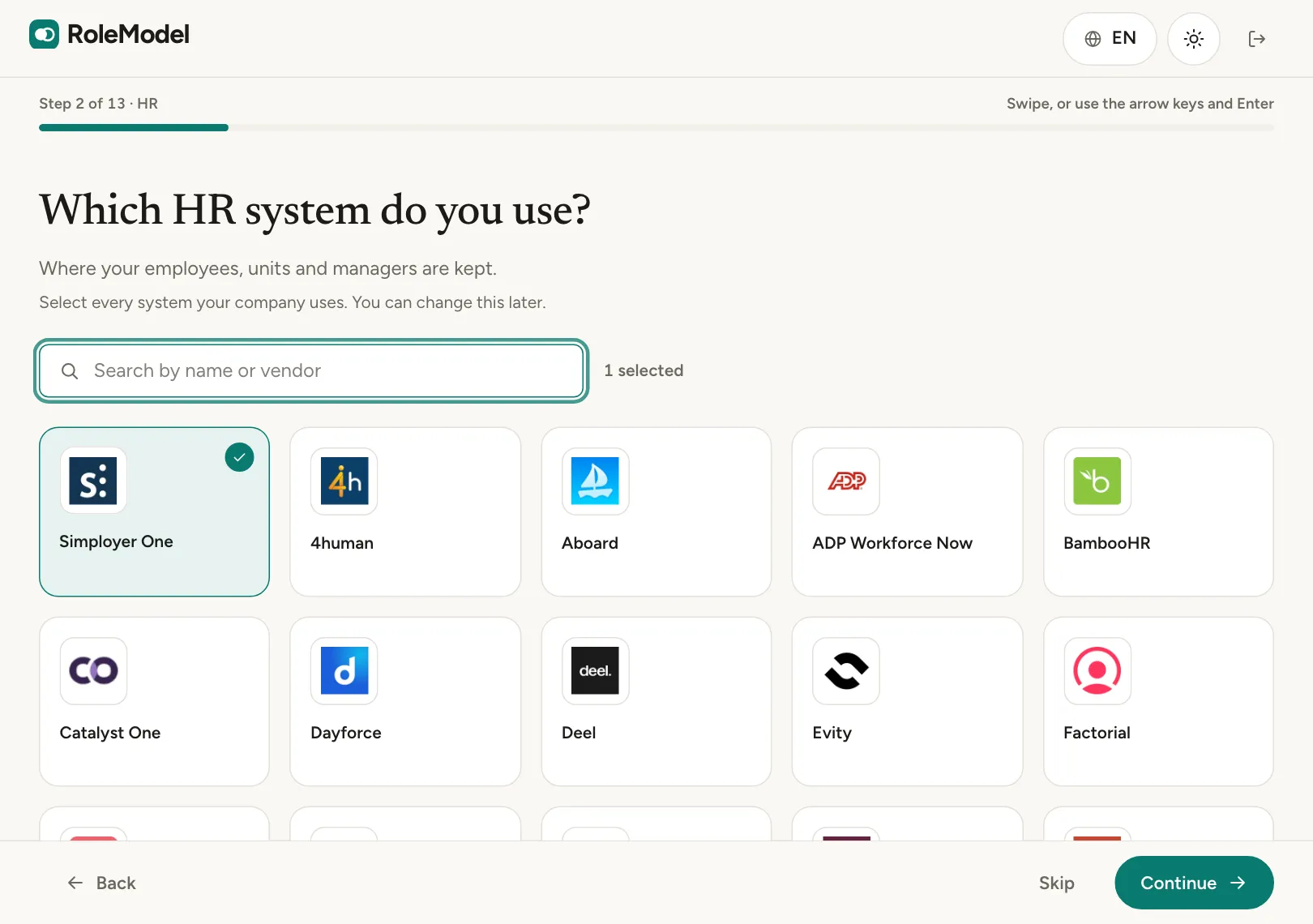
- Set up systems. The first time you sign in, and again after every reset, the setup takes the whole screen. There is no menu, and the other pages stay closed until it is finished. It has 13 steps: your company, then one step each for HR, payroll, time and scheduling, recruitment, engagement, learning, finance and identity, one step for anything else, a summary, a step where you name your RoleModel and a short connecting screen. The summary shows how many of the 120 questions your systems can answer. In the naming step you can type a name or click Skip to keep the name RoleModel. The name is only shown in the app. Use the demo setup fills in the example company and nine typical systems at once. Once the setup is finished the menu appears, and you can edit your choices later from Set up systems in the sidebar.
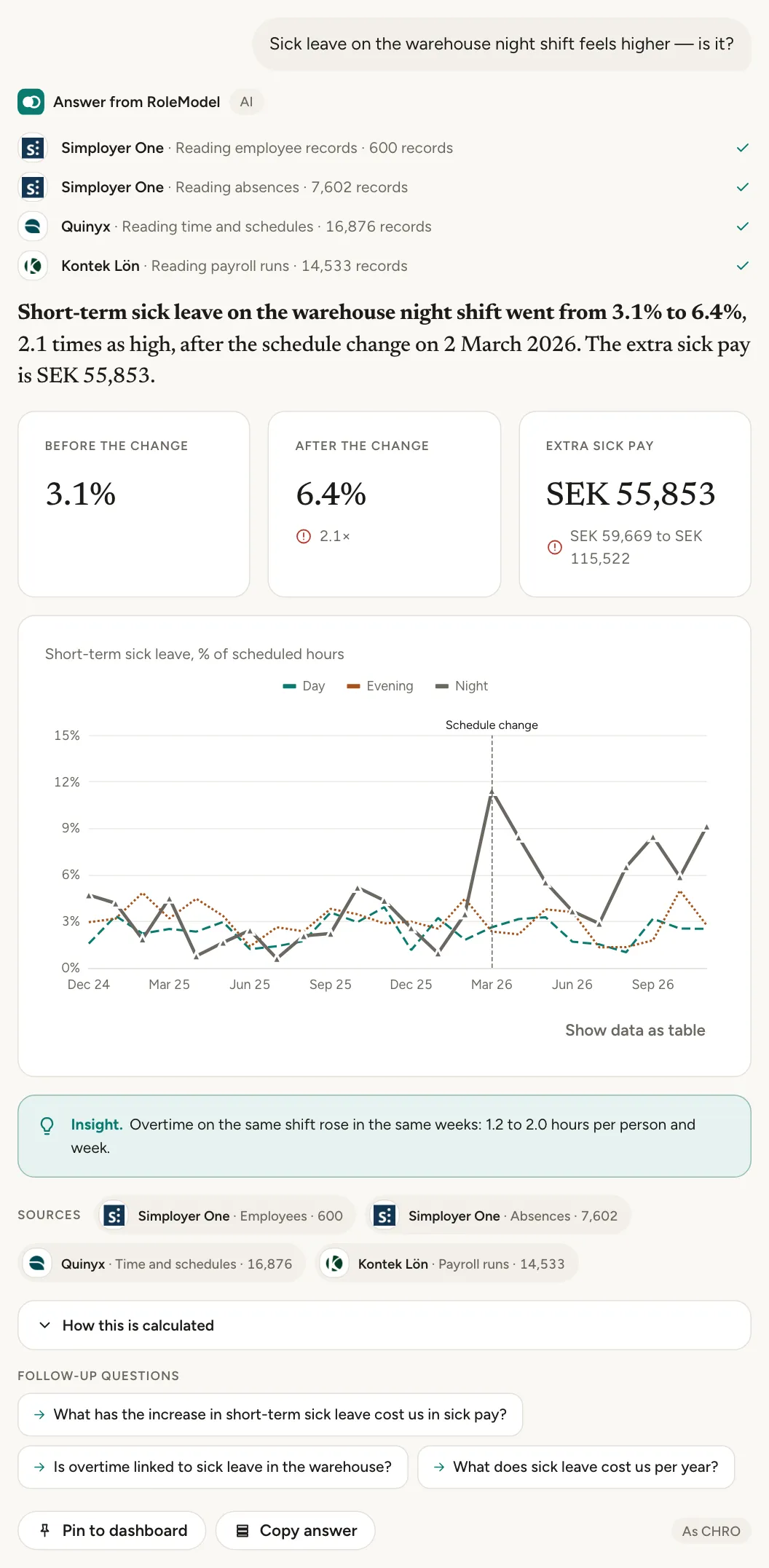
- Ask. Type a question. The answer comes with a number, a chart, the systems and how many records it is based on, and a description of how it was calculated (How this is calculated). You can pin the answer to the dashboard.
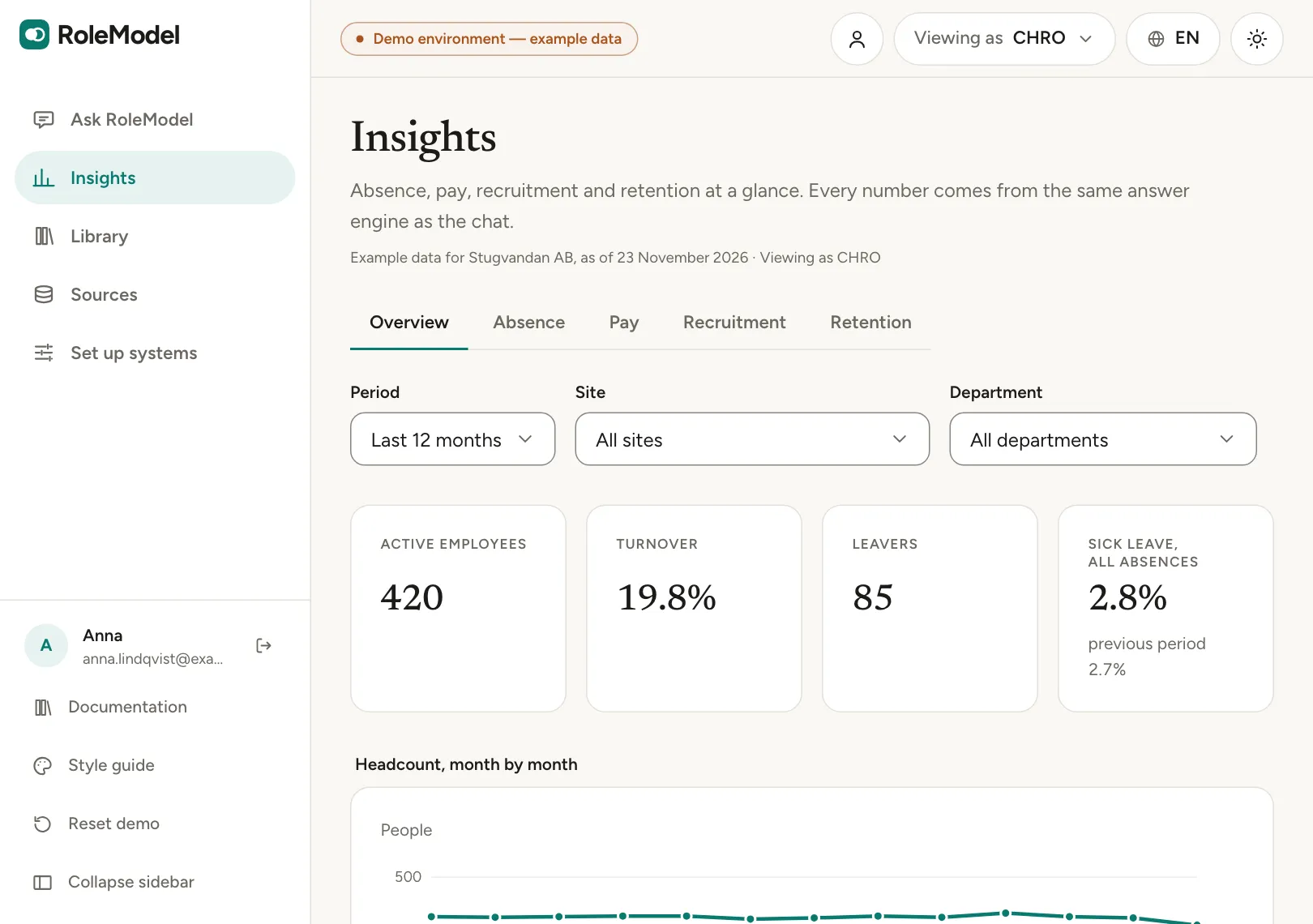
- Insights. An overview with key figures and charts for absence, pay, recruitment and retention, with filters for period, site and department. It also holds signals, meaning what stands out in the data without you asking, and the answers you pinned.
- Library. All 120 questions the product is meant to answer, with the systems each one needs. 69 of them can be asked in the demo. The rest are marked In the product and do not count here.
- Sources. Connected systems, what is missing in the company's data and a catalogue of 163 systems with the route to reading data from each.
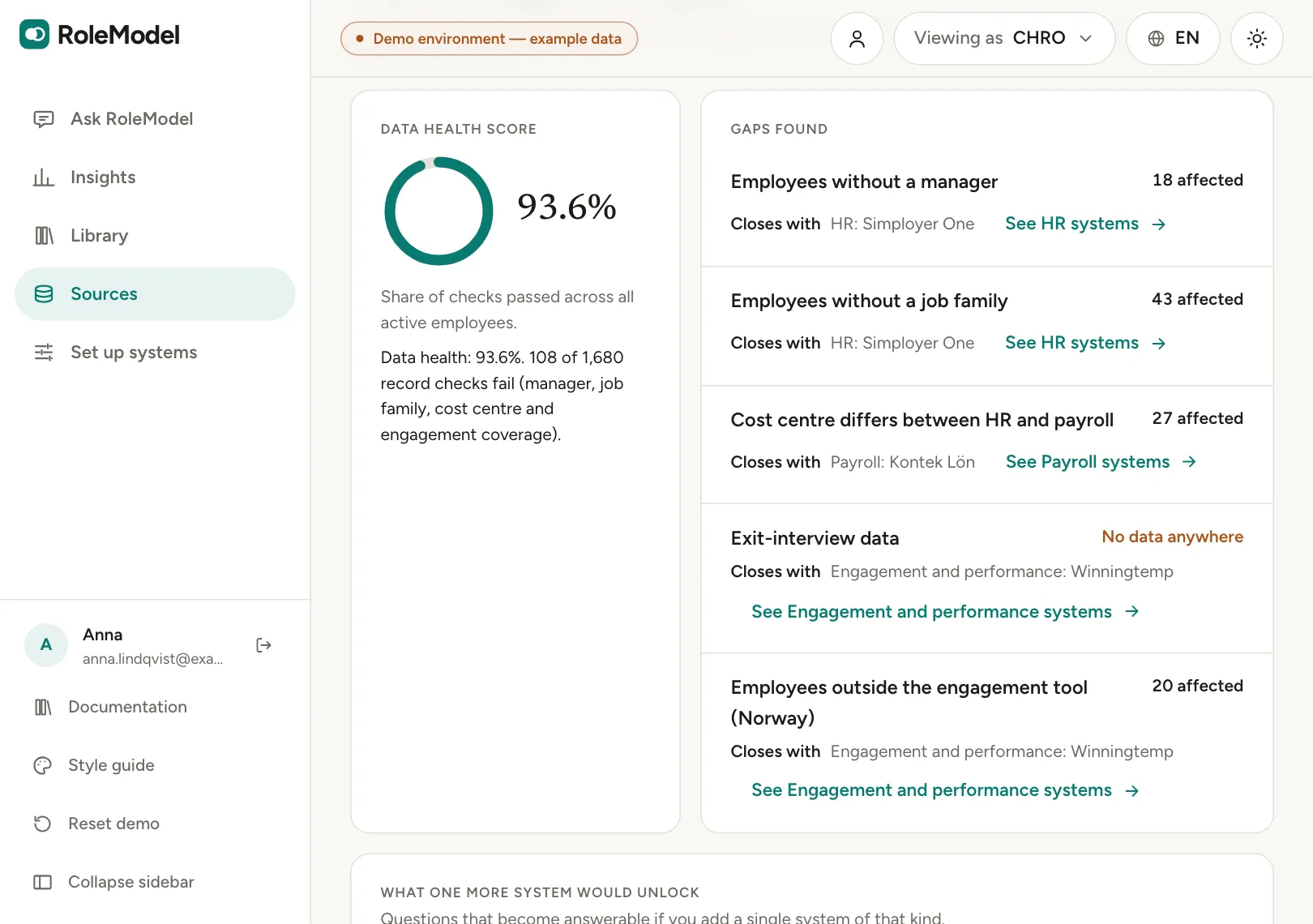
At the bottom of the sidebar you find Documentation (this page) and Reset demo. Top right you change role, language and theme.
What is example data#
Everything shown as data: the company, the people, pay, absence, hires, survey answers, accounts and licences. The data was generated once with a fixed seed, so the same question always gives the same answer. What is not data (pages, buttons, wording) is the mockup's own design. Section 3 goes through what is pretend and what works for real.
The mockup compared with Twine#
Twine is a Swedish provider of integrations between HR, payroll and time systems. The comparison rests on what Twine itself writes on its public pages (twine.se) and in its public API documentation (docs.twine.se), as they stood on 23 November 2026. RoleModel has no agreement or integration with Twine. The text describes two different layers and how they could complement each other.
| Area | Twine provides | RoleModel adds in the mockup |
|---|---|---|
| Connecting to systems | Connections to HR, payroll and time systems, listed per system on Twine’s public pages. A product that lets a vendor fetch data from its customers’ systems through one API, where the customer approves every connection. | No real connections. The mockup shows how a customer picks their systems and what they unlock. Example data exists in each vendor’s own format for 44 systems and as a template for the rest. |
| What data | A documented read API for employees (with many date-tracked properties, including salary, FTE, weekly hours and hire and end dates), organisational units, time reports (absence and attendance), salary transactions (payouts, bonuses, deductions and other payroll lines), competences and jobs. | One model across HR and systems outside HR: recruitment, surveys and performance, learning, finance, identity and licences, CRM. Questions that need two or more of them are answered in one answer. |
| How you get at the data | An API with a sandbox on request, and an MCP server (launched 24 September 2026) for reading employees, time reports, organisational units and jobs. | Questions in your own words in a chat window, with the answer as a number, a chart and the source. |
| Questions and definitions | The public material describes the data and the API. What to ask of it, and how a metric is defined, is left to whoever builds on top. | A question library of 120 questions and calculated metrics, with a definition shown for every answer (How this is calculated). |
| Access | For the product where vendors fetch data from their customers’ systems: the customer approves every connection. | Role scope in the answer: the CHRO, the CEO and the warehouse manager see different things, and groups under 5 people are masked. |
| Overview and follow-up | Not described in the material this comparison rests on. | Dashboards, signals shown without anyone asking, pinned answers and a page that shows which gaps the company’s data has and which system would close them. |
How the two would fit together#
- Twine as the read layer for payroll, time and absence data. What Twine describes publicly (time reports for absence, and salary transactions) is the kind of data the stories about sick leave, overtime and pay need.
- RoleModel as the model and the interface on top. Data from Twine goes into the same model as data from systems Twine does not cover, such as recruitment, surveys, learning and identity. The questions, metrics, role scope and gaps live in RoleModel.
- One way to swap a source. The model is the same wherever the data comes from. A system can be read through Twine, through the vendor’s own API or from a file, without the questions changing.
- Scheduled reads. Twine states that the API shows the latest data fetched and that webhooks are on its roadmap. RoleModel would therefore read in batches, not in real time.
What neither has yet#
- RoleModel: real connections, real sign-in, role scope enforced on the server and a data-protection assessment (DPIA) for a real product. The mockup only shows how it would look.
- Twine: according to its API specification there are no resources for candidates and applications, survey results or schedules. Webhooks are described as upcoming.
- Both: an agreement on how they would work together. None exists, and it is outside this page.
How it works#
This section explains what happens behind the screens.
The example company#
Stugvandan is a fictional Nordic retailer of home and outdoor goods, with 420 active employees and 180 who have left since December 2023. It has a head office in Stockholm, a tech office in Göteborg, a central warehouse in Jönköping, stores in Sweden, customer service and a small Norwegian operation (19 sites). Both salaried and hourly staff are included, so scheduling, overtime and collective agreements have data to show. The history runs up to 23 November 2026, and that is the day the demo treats as today.
The data holds 12 stories, meaning findings planted in advance that need data from several systems to show. They are the basis of the test checklist in section 4.
The catalogue of 163 systems#
The catalogue on the Sources page lists 163 systems in 18 categories. For each system it states which route exists to read data from it, as far as the vendor’s public documentation says:
- Through Twine: 38 systems that Twine’s public pages list connections for.
- The vendor’s own API: 76 systems.
- Through a unified API: 1 system.
- Planned: 48 systems where no route was found in the public documentation.
A route in the catalogue describes how a system could be reached. It is not a connection that exists in the demo. The logos come from Logo.dev and only show that the system is in the catalogue.
Computed answers and live answers#
There are two ways to get an answer.
- Computed answer. The question is matched against the question library and calculated by code in the app. The same question gives the same answer every time. That is how every question in the library works (69 of 120 in the demo).
- Live answer. A question that is not in the library goes to a language model (Claude from Anthropic). The model never sees the raw data and does not calculate. It calls the same metric functions as the computed answers, up to six rounds per question, and may only write figures those functions returned. A chart or table with a number that did not come from a function is rejected. The answer is labelled Live answer, and you can see which calls were made.
If a live answer is not available, for example when the day’s limit for the demo has been reached, the app says so openly and suggests the closest library questions instead of guessing. Such a reply does not count against your free questions.
Where the numbers come from#
Every answer shows which systems and how many records it is based on, and How this is calculated describes the metric. The figures in the 12 stories are planted in the data in advance and saved as an answer key. Automated tests check that the answer engine produces exactly those figures. The figures on this page are read from the same answer key when the page is built, so they cannot drift apart from the app.
Role scope and masking#
Top right you choose who you are looking as:
- CHRO sees everything, including named individuals.
- CEO sees aggregates only, no named individuals.
- Warehouse manager sees only their own organisation.
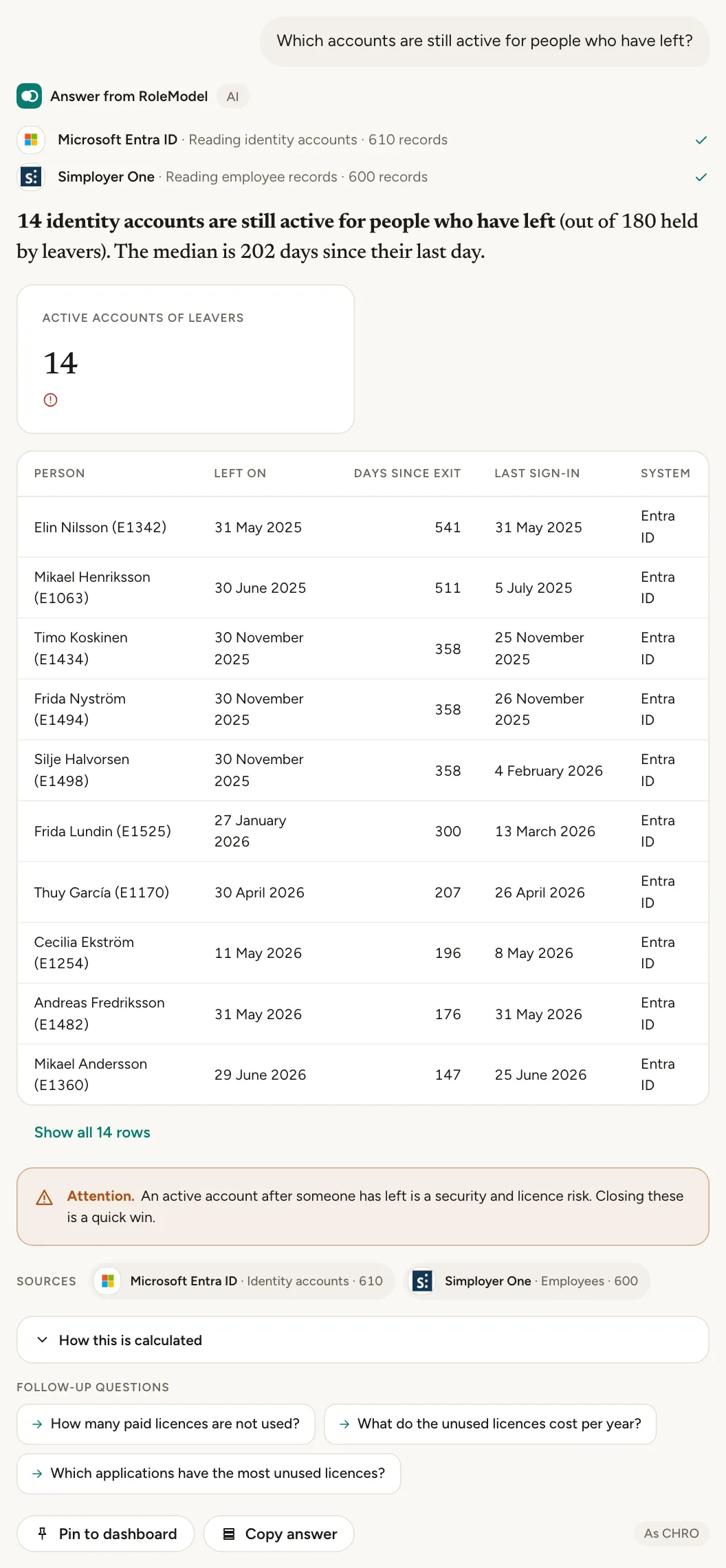
Groups under 5 people are masked for every role. Sick leave is health data under the GDPR, so access control is part of the product and not an afterthought. The pictures show the same question asked as the CHRO and as the CEO. The answer has the same figure (14 accounts), but only the CHRO is shown which people it concerns.
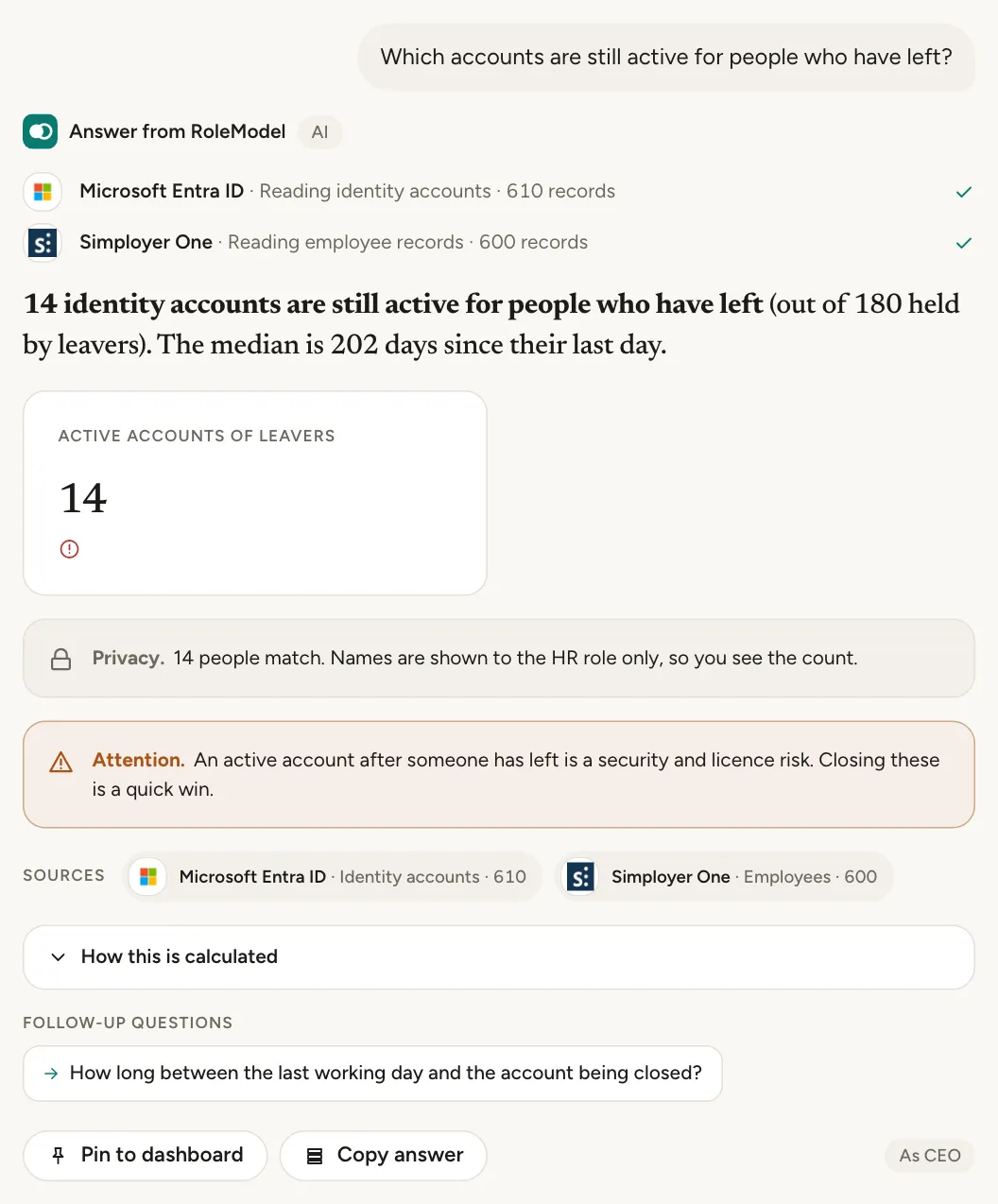
In the mockup, role scope and masking are applied in the browser. In a real product they must be enforced on the server.
The limit of 10 questions and example plans#
Every account gets 10 free questions. A question counts when an answer is delivered, computed or live. What does not count: the app finding no answer, the card asking you to connect a system, reopening earlier answers from the history, and the dashboards recalculating. Under the input field it says how many are left, from the first question on.
When the last question is used, a dialog opens with three example plans, priced per employee per month. After you close it the input field and the suggestion buttons are locked, and a message with the button See plans appears. History, pinned answers, Insights, Library and Sources keep working. Only Reset demo gives the questions back. It keeps you signed in, as well as your theme and language, clears everything else and takes you back to the first step of the setup.
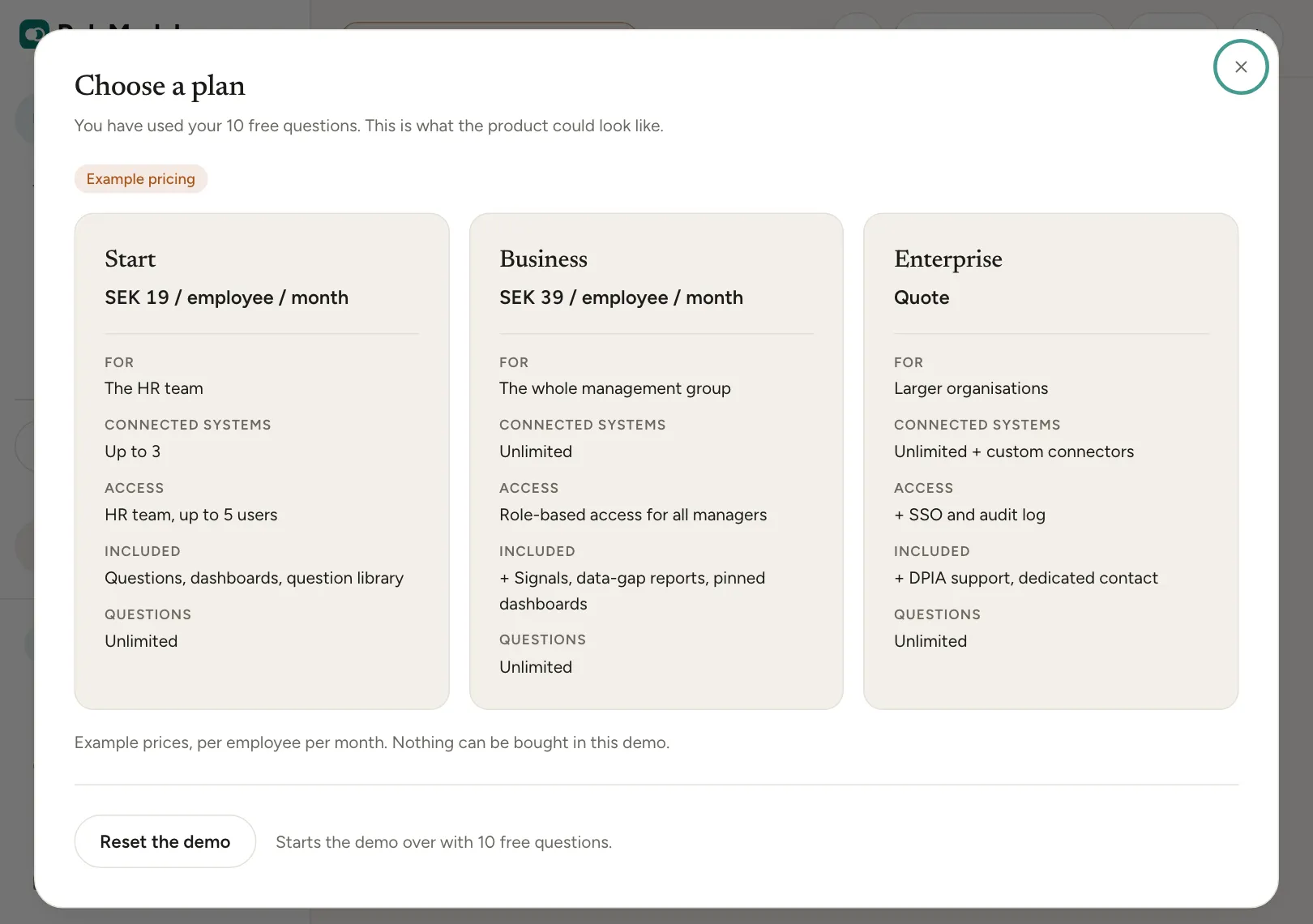
The prices are placeholders to be replaced with your own. The counter is kept on the server for your account, so it follows you to another browser or device. Because Reset demo gives the questions back, the limit is a demo limit and not a safeguard.
What is pretend and what works for real#
| Pretend in the mockup | Works for real |
|---|---|
| Google and Microsoft sign-in: shown, but not available yet. | Accounts and sign-in with a one-time email link, and the question count kept per account. |
| Connecting systems: the animation shows systems being read, but no system is contacted. | The answer engine: every figure is calculated from the example data with the definitions shown in the answer. |
| The plans and prices: examples, nothing can be bought. | The sources under each answer and the number of records they rest on. |
| The limit of 10 questions: a demo limit, since Reset demo gives the questions back. | Live answers: a real language model that may only use figures it fetched from the metric functions. |
| Role scope and masking are applied in the browser here, not on the server. | Roles and masking: the logic is what would apply when it is enforced on the server. |
| The data: a made-up company. | The question library, the catalogue with documentation links and the page showing gaps in the data. |
How to test it#
Open the demo with the button Open the demo at the top and create an account. You get a one-time link by email and no password is needed. Your question count is kept on your account; the rest of what you do (company, systems, history, pinned answers) is saved only in your own browser.
Fifteen minutes#
- Minutes 0 to 2Sign in and set up the demo. Create an account, open the link in the email and press Sign in. The setup opens full screen, without the menu. Click Use the demo setup and then Continue, which takes you past the 13 steps to the summary. Then you reach the naming step: type a name for your RoleModel or click Skip. The connecting screen takes about six seconds. When it ends you land on Ask, and the menu appears.
- Minutes 2 to 5Ask a question. Type the night-shift question from S1 below. Look at the figures, the chart and the sources. Open How this is calculated. Click a follow-up question.
- Minutes 5 to 8Switch role. Ask the question about accounts of people who have left (S4) as CHRO, then switch to CEO and ask it again. Do the same as warehouse manager and notice that the figure changes.
- Minutes 8 to 10Pin and look at Insights. Click Pin to dashboard under an answer. Open Insights, switch tabs and change the filters. Look at the signals and at your pinned answer.
- Minutes 10 to 12Library and Sources. Filter the library by an area or a role. Open Sources: look at the gaps in the data and search the catalogue for a system you use yourself.
- Minutes 12 to 14Use your own words. Type the same question in other words. Then type a question that is not in the library and see how the live answer is labelled. Type something that does not belong here and see how the app says it cannot answer.
- Minutes 14 to 15Language, theme and phone. Change language and theme top right. Open the demo on your phone: the menu is behind the button top left, and in the setup you can swipe between the steps.
This walk-through uses about six of your 10 free questions.
The 12 stories#
Each story is a finding in the data that needs more than one system to show. Type the question exactly as written and it matches a question in the library and always gives the same answer. Tick each one when what you see matches. Your ticks are saved in the browser.
-
- Type
Sick leave on the warehouse night shift feels higher — is it?- You should see
- Short-term sick leave on the warehouse night shift goes from 3.1% to 6.4% after the schedule change on 2 March 2026. The extra sick pay is SEK 55,853. The chart has a line for the schedule change. Overtime rises over the same weeks, from 1.2 to 2.0 hours per person and week.
-
- Type
Do we have unexplained pay differences between women and men?- You should see
- Women Account Managers earn 7.8% less than men at the same level (5 women, 4 men). In the other 8 roles the gap stays within 1.1%.
-
- Type
How has eNPS developed in Tech since the January reorganisation?- You should see
- Tech eNPS falls from +32 to +4 after the January 2026 reorganisation, and 5 senior developers leave in the six months after.
-
- Type
Which accounts are still active for people who have left?Follow-up, optional, and it counts too:What do the unused licences cost per year?- You should see
- 14 identity accounts are still active for people who have left. As CHRO you get a table of who. The follow-up shows that 37 paid licences have not been used for 90 days and cost SEK 131,700 a year, 13 of them with people who have left.
-
- Type
Which managers have more than 15 direct reports, and how are their teams doing?- You should see
- 3 managers have more than 15 direct reports, and their teams lose people faster than the other teams.
-
- Type
What share of applicants come from referrals, and what share of hires?Follow-up, optional, and it counts too:What does the staffing agency cost us, and how long do its hires stay?- You should see
- Referrals are 9% of applicants but 31% of hires, and referral hires have the best 12-month retention (94% still here). The basis is 4,622 applications and 236 hires. The follow-up shows that the staffing agency cost SEK 1.2M in 2025 and that 40% of its hires left within 12 months.
-
- Type
How many people have worked more than 150 hours of overtime so far this year?- You should see
- 9 employees have worked more than 150 hours of overtime from January to October 2026, and 2 of them are above the 200-hour yearly cap.
-
- Type
How large is our vacation liability?- You should see
- The vacation liability is SEK 14.2M. 31 employees have more than 25 saved vacation days.
-
- Type
What share has completed the mandatory safety training?Follow-up, optional, and it counts too:Which forklift licences expire in the next 60 days?- You should see
- 71% have completed the mandatory security training (298 of 420). Two departments are far behind. The follow-up shows that 12 forklift certificates expire within 60 days.
-
- Type
What share of revenue goes to personnel cost, by unit?- You should see
- Personnel cost takes the largest share of revenue in the Norwegian stores, 27.1%, against 15.2% in the Swedish stores and 12.4% in B2B sales.
-
- Type
What data is missing in our systems?- You should see
- Among other things 18 employees without a manager, 43 without a job family and 27 with different cost centres in HR and payroll, and no data at all from exit interviews.
-
- Type
What share of the warehouse staff turns 65 within three years?Follow-up, optional, and it counts too:Which key roles have no named successor?- You should see
- 11% of the warehouse staff (12 of 110) turn 65 within three years. The follow-up shows that successors are named for 2 of 9 key roles.
The figures come from the same answer key the tests use. If something you see differs from the line above, that is a bug, and we want to know.
How the limit of 10 questions affects testing#
The 12 stories are more than 10 questions, and switching role and asking again counts too. So the test goes in two rounds, with a reset in between.
- First round (10 questions): stories S1 to S10, one question each, in order. The tenth question opens the plans dialog. Before you reset: pin an answer and look at Insights, Library and Sources, because pinned answers disappear on reset.
- Reset. Click Reset demo at the bottom of the sidebar and then Yes, reset (or Reset the demo in the plans dialog). That gives back all 10 questions. You stay signed in, so there is no sign-in page: you land on the first step of the setup, full screen and without the menu. Theme and language stay. With the demo setup it goes fast: Use the demo setup, Continue and Skip in the naming step. You are back on Ask in under a minute.
- Second round (after the reset, about six questions): stories S11 and S12, then the role switches (S4 as CEO and as warehouse manager) and one answer in your own words and one question outside the library.
Questions that get no answer do not count, so you can try nonsense questions without using anything up.
Role, language, theme and phone#
- Role. The Viewing as menu top right. Ask the same question as CHRO, CEO and warehouse manager and compare. Story S4 is the clearest.
- Language. Swedish and English. The questions in this list exist in both languages, and the Swedish page has the Swedish questions.
- Theme. Light, dark or the system’s. The charts change colour immediately, without reloading.
- Phone. Open the demo on a phone or make the browser window narrow. The sidebar becomes a menu, and the setup can be swiped through.
What feedback is most useful#
- Which questions your customers would ask first, and which are missing from the library.
- Answers that feel wrong, unclear or hard to trust, and what would make you trust them.
- Whether the sources and metric definitions are enough when someone challenges a number.
- Who should see what: do the roles match how your customers are organised?
- Which systems and which data are missing for the product to be useful at a customer.
- The plans: do the tiers match how you would sell?
- Anything that felt like a demo rather than a product.
Known limitations and next steps#
- All data is example data for a fictional company, frozen at 23 November 2026.
- No real systems are connected. The routes in the catalogue are researched but not built.
- Roles and masking are applied in the browser. The limit of 10 questions is a demo limit: Reset demo gives the questions back.
- Of 120 questions in the library, 69 can be asked. The others are described but have no calculation.
- Live answers take longer than computed ones and may be unavailable when the day’s limit has been reached.
- The answers are about groups, not about scoring or predicting individual people. That is a deliberate choice. The legal position for a real product has to be assessed by a lawyer, and this is not legal advice.
- The app exists in Swedish and English.
Next steps#
- Read real data from a first system and check the answers against the customer’s own figures.
- Role scope enforced on the server, and sign-in through Google and Microsoft.
- A data-protection assessment (DPIA) before a real customer is connected.
- Decide which systems are read through an intermediary and which directly.
- Later: comparisons against public statistics, scheduled reports and actions straight from an answer.
Personal data#
To sign in, the demo stores real personal data about you. This is what is stored, why, where, and how you remove it.
- What: your name, your work email address, your role (and the text you wrote if you chose Other), your company name, the number of questions you have asked, when your account was created and when you last signed in. A sign-in cookie that lasts 30 days keeps you signed in. A one-time sign-in link is stored as a one-way fingerprint for 15 minutes. To limit abuse, your email address and your internet address are kept for at most an hour as one-way fingerprints, never in plain text.
- Why: to let you sign in without a password, to count your free questions and to run the demo. There is no analytics and no marketing use. Nothing is sold or passed on for other purposes.
- Where: in a database at Cloudflare in the EU jurisdiction. The sign-in email is sent through Cloudflare’s email service.
- Your questions: when a question needs a live answer, the text you typed, together with the figures the metric functions return from the example data, is sent to Anthropic to produce the answer. RoleModel does not store your questions on the server. The history and the pinned answers stay in your browser.
- Removing it: open the account menu at the top right and choose Delete my account. That removes your account, your sign-ins, your sign-in links and your question count at once, and clears what this browser has saved. You can also ask whoever invited you to the demo to delete it.
This describes how the mockup works. It is not legal advice and it is not the data-protection assessment a real product needs.